by Thiwanka Senarathna — March 25, 2026
Are you planning to upgrade your Oracle E-Business Suite environment but unsure how to execute it without something breaking in production? You are not alone. Most DBAs understand the theory of an EBS tech stack upgrade. The real challenge is execution missing a prerequisite, applying a patch at the wrong time, or misunderstanding the online patching cycle can bring an entire migration to a halt.
I have been working with Oracle EBS environments for over six years, and the single biggest lesson I have learned is this: the DBAs who succeed in complex migrations are the ones who overprepare. They run every check twice, they understand why each step exists, and they know what failure looks like before it happens.
This guide is my attempt to document that level of preparation for the Oracle EBS 12.2 Next Generation Technology Stack migration based on Oracle's official 2025 roadmap, My Oracle Support documentation, and real-world DBA experience.
Why This Upgrade Is Different From a Standard EBS Patch
Before getting into the steps, it is worth understanding what makes this migration architecturally different from a routine EBS patch cycle.
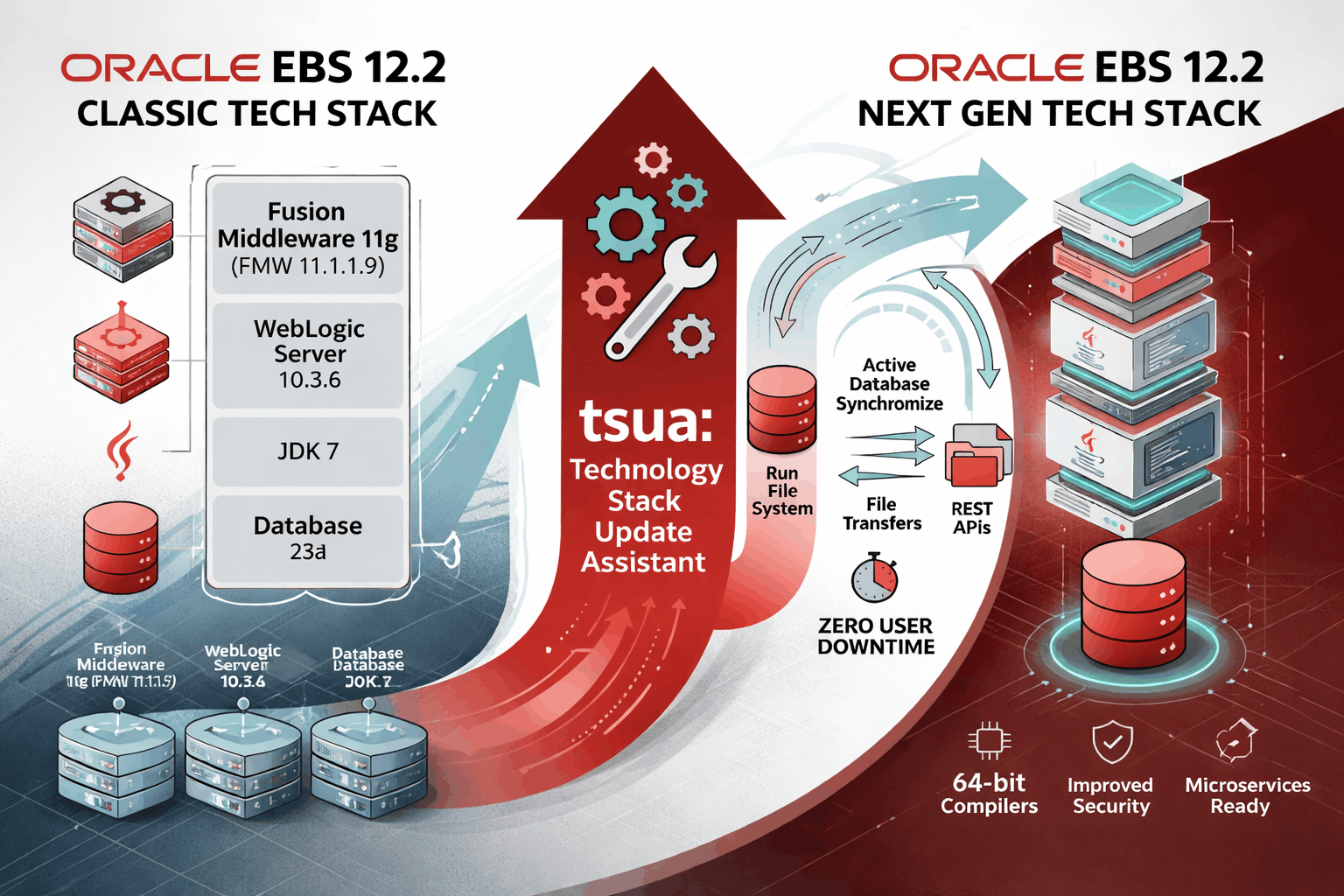
When Oracle releases a Release Update Pack (RUP), you download a patch, run adop, and you are done. The Next Generation Technology Stack upgrade is fundamentally different. You are replacing the entire underlying middleware WebLogic, Oracle HTTP Server, Fusion Middleware, Forms, Reports, and the Java runtime while keeping your EBS application code at the same level.
Think of it like replacing the engine in a car while keeping the body, interior, and electronics the same. The application code your EBS modules, customizations, and PL/SQL stays intact. What changes is everything below it: the middleware stack that runs, compiles, and serves that application.
The other critical difference is that Oracle generates a custom migration patch specific to your environment. No two EBS environments are identical every site has a different combination of RUPs, one-off patches, and customizations applied over the years. Oracle uses a manifest file from your environment to produce a migration patch that matches your exact code levels, recompiled for the new stack. This is why the process is more orchestrated than a standard patch cycle, and why strict sequencing matters.
What Changes: Classic Stack vs. Next Generation Stack
Here is the complete picture of what you are moving from and to:
Component | Classic Technology Stack | Next Generation Stack |
|---|---|---|
Fusion Middleware (FMW) | 11.1.1.9 | 14c |
WebLogic Server (WLS) | 10.3.6 | 14c |
Oracle HTTP Server (OHS) | 11.1.1.9 | 14c |
Oracle Forms | 10.1.2 | 14c |
Oracle Reports | 10.1.2 | 14c |
Java Development Kit | JDK 7 | JDK 17 |
Oracle Database | 19c (minimum) | 23ai |
Operating System | Oracle Linux 7 | Oracle Linux 8 (required) |
Reporting Engine | BI Publisher 10g | Oracle Analytics Publisher |
Beyond the version numbers, this upgrade delivers three meaningful improvements for production environments:
Security: JDK 7 reached end of public updates in April 2015. Running a production EBS environment on JDK 7 means you are operating on an unpatched Java runtime. JDK 17 is a long-term support release with active security patching through at least 2029.
Performance: WLS 14c and OHS 14c include significant improvements in request handling, connection pooling, and memory management compared to the 10.x-era components currently running in Classic stack environments.
Future compatibility: Oracle's entire EBS roadmap including future RUPs, certifications, and feature releases is being built against the Next Generation stack. Staying on the Classic stack means falling behind Oracle's development baseline.
Note from Oracle: Final certified versions for the Next Generation Technology Stack remain to be determined. Oracle is actively developing and testing with FMW 14c, WLS 14c, OHS 14c, Forms and Reports 14c, and JDK 17. Always refer to MOS Note 3000000.1 for the latest certification status before starting your migration.
Step 1: Verify Environment Readiness
This is the most underestimated step in the entire process. I have seen migrations stall for days because teams skipped environment verification and discovered blockers mid-execution. Run these checks before you plan anything else.
1.1 Check Your EBS Release Version
sql
-- Run as the APPS user
SELECT release_name
FROM   apps.fnd_product_groups;

-- Required result: 12.2.7 or higher
-- As of July 2024, EBS 12.2.7 is the minimum baseline for
-- Next Gen Tech Stack certification.
-- Latest available as of 2025: EBS 12.2.14
If you are below 12.2.7, you must apply the appropriate Release Update Pack before proceeding.
1.2 Check Your Oracle Database Version
sql
-- Verify database version
SELECT banner
FROM   v$version
WHERE  banner LIKE 'Oracle Database%';

-- EBS is being certified on Oracle Database 23ai as
-- certification becomes available. Verify the latest
-- certified version via MOS Note 3000000.1.
1.3 Check AD, TXK, and ATG PF Code Levels
This is one of the most commonly missed checks. Use the correct query against the AD_TRACKABLE_ENTITIES table:
sql
-- Check AD, TXK, and ATG PF code levels (run as APPS)
-- This is the correct and verified query used by Oracle DBAs

col ABBREVIATION for a10
col NAME         for a40
col CODELEVEL    for a20

SELECT ABBREVIATION, NAME, CODELEVEL
FROM   AD_TRACKABLE_ENTITIES
WHERE  ABBREVIATION IN ('ad', 'txk', 'atg_pf')
ORDER BY ABBREVIATION;

-- Sample output:
-- ABBREVIA   NAME                                     CODELEVEL
-- --------   ---------------------------------------- ----------
-- ad         Applications DBA                         C.15
-- atg_pf     Oracle Application Technology Group PF   C.12
-- txk        Oracle Applications Technology Stack     C.15
Minimum code level requirements for the Next Gen Tech Stack:
AD: C.15 or later
TXK: C.15 or later
ATG PF: C.12 or later
EBS Release: 12.2.7 or later
1.4 Check Online Patching (ADOP) Status
bash
# Check current ADOP session status from the OS
$ adop -status

# Sample output when no cycle is in progress:
# Checking for existing adop sessions.
# No pending session exists.

# Also verify from the database — check last completed session:
# (run as APPS in SQL*Plus)
SELECT adop_session_id,
       prepare_status,
       apply_status,
       finalize_status,
       cutover_status,
       cleanup_status,
       status
FROM   ad_adop_sessions
ORDER BY adop_session_id DESC
FETCH FIRST 5 ROWS ONLY;

-- All status columns should show 'Y' (complete) for the last session
-- before you start a new migration cycle.
1.5 Check OS Version
bash
# Verify operating system version
cat /etc/oracle-release
# or for RHEL:
cat /etc/redhat-release

# Required: Oracle Linux 8 or Red Hat Enterprise Linux 8
#
# Oracle Linux 8 and RHEL 8 were certified with EBS 12.2 in June 2021.
# In-Place OS upgrade from OL7 to OL8 with EBS 12.2 was
# certified in July 2024 — no need to reprovision servers.
#
# Support timelines:
#   Oracle Linux 8 Premier Support:  until July 2029
#   Oracle Linux 8 Extended Support: until July 2032
#   RHEL 8 Maintenance Support:      until May 2029
1.6 Check Available Disk Space and Memory
bash
# Check disk space on key EBS mount points
df -hP $ORACLE_HOME $APPL_TOP $INST_TOP

# Check memory and swap — WLS 14c needs more heap than WLS 10.3.6
free -m
swapon --show

# The Next Gen Tech Stack stage area download is substantial.
# Plan for at least 50-100 GB of free space on your /stage_dir mount.
Reference: MOS Note 1330701.1 Oracle E-Business Suite Installation and Upgrade Notes Release 12 (12.2) for Linux x86-64.
Step 2: Run the Next Gen Tech Stack Readiness Checker
Oracle provides a dedicated Next Generation Technology Stack Readiness Checker, delivered as a standalone patch. Running it before any other migration activity is the most important step you can take to prevent a failed migration.
The checker runs against your live EBS 12.2 environment with the Classic Tech Stack still in place and produces a full report of every blocking and advisory item for the Next Gen Tech Stack update.
It validates:
Oracle Database release requirements
EBS patch level requirements (ATG PF, AD, TXK code levels)
WebLogic configuration issues that must be resolved ahead of the update
Customization compatibility for Linux 8, Developer 14c, and Java 17
sql
-- Apply the Readiness Checker patch from Oracle first,
-- then connect and run the script:

$ sqlplus apps/<password> @ADTSURC.sql

-- Sample output:
-- ============================================================
--  EBS Tech Stack Update Readiness Checker
--  $Header: ADCHKTSU.sql 120.13.12020000.103 2024/10/18
-- ============================================================

-- INSTANCE_NAME   DATABASE_NAME   VERSION        SYSDATE
-- -----------     -----------     ----------     ----------
-- ebscdb          ebsdb           19.0.0.0.0     21-MAY-25

-- Online Patching Enabled?
-- ------------------------
-- Yes

-- SECTION-1: Prerequisite versions required for Tech Stack Update
-- You must be on the following versions:
--   1) ATG PF Delta 12 or later  →  C.12
--   2) AD Delta 15 or later      →  C.15
--   3) TXK Delta 15 or later     →  C.15
--   4) EBS 12.2.7 or later       →  12.2.7
--
-- Fix: Apply prerequisites shown above before performing
--      the tech stack update process.

-- SECTION-2: Linux 8 platform requirements
-- ...

-- SECTION-3: WLS domain configuration checks
-- ...

-- SECTION-4: Customization compatibility scan
--   Custom Forms found: results vary per environment
--   Review any flagged files for Forms 14c compatibility
-- ...
Do not proceed to manifest generation until the Readiness Checker shows zero blocking items. Every finding must be resolved — especially AD/TXK/ATG PF version blockers and WebLogic configuration issues.
Step 3: Understand Code-Level Compatibility — The Step Most Teams Underestimate
Oracle Development has already successfully rebuilt all standard EBS releases with the Next Generation Technology Stack as part of ongoing internal development and testing. Most standard EBS code compiled without any changes at all.
Your custom code is a different story. Here is the breakdown by code type:
Database PL/SQL — No changes required. PL/SQL is fully forward-compatible across this stack change. Your stored procedures, packages, and functions do not need modification.
C/C++ Extensions — Must be rebuilt in 64-bit mode. Common issues: type reference errors, undefined identifiers, and #include path updates.
Java Customizations — Review for removed APIs. JDK 17 removes several APIs deprecated in earlier releases. Most commonly encountered in EBS customizations:
java.lang.Runtime: public java.io.OutputStream— removedjava.lang.Thread.stop(Throwable)— removed
Oracle Forms 14c — Stricter syntax enforcement. Common compatibility issues in custom Forms:
Stricter RECORD GROUP syntax — previously tolerated patterns now fail compilation
Identifier must be declared — variable scoping enforced more strictly
Remove Item Type — deprecated property must be removed
Desupported APIs that need replacing with supported equivalents
Oracle Reports 14c — Deprecated features. Custom Reports need review for:
STPROC keyword — deprecated in Reports 14c
Lexical parameters in SQL Queries with invalid initial values
Practical advice: Run a Forms compilation test against Forms 14c in your development or clone environment before submitting your manifest. Finding and fixing custom Forms errors before production migration saves enormous time. A compilation failure discovered after TSUA runs is far more disruptive than one found in a pre-migration dev test.
Step 4: Generate the Manifest File
This is the critical sequencing point. The manifest is a complete inventory of every compiled object file in your EBS application tier, with exact version numbers. Oracle uses this to build a migration patch matched precisely to your environment.
bash
# Source the EBS run file system environment first
$ source <EBS_ROOT>/EBSapps.env run

# Navigate to the AD_TOP bin directory
$ cd $AD_TOP/bin

# Generate the manifest
$ perl adgentsu.pl

# The script produces adgentsu.txt in the current directory.
# It contains an entry for every .o object file in your environment:
A sample manifest file looks like this:
###############################################
# Example manifest file contents:
###############################################
# Application_System_Name: ebsdb
# Release: 12.2.13
# Appl_Top_Name: ap654app    # Platform: LINUX
# Appl_Top_Name: tafnw       # Platform: LINUX
# Appl_Top_Name: apps        # Platform: LINUX
# extension  current             baseline  module
ad           adadmin.o           120.41.12020000.8
ad           adadmin_main.o      120.12.12020000.3
ad           adapps.o            120.8.12020000.3
ad           adccfl.o            120.9.12020000.3
ad           adcds.o             120.8.12020000.3
ad           adcfil1.o           120.10.12020000.3
ad           adcfil2.o           120.8.12020000.3
# ... continues for all files in your environment
Upload to My Oracle Support
Log in to My Oracle Support and navigate to the Oracle Applications Technology Stack Update form. Upload the manifest with:
Email Address: Your MOS-registered email (Oracle sends your patch notification here)
Description: e.g., "EBS Next Gen Tech Stack migration patch for [Your Organization Name]"
File Manifest: Attach your
adgentsu.txtfile
Oracle will process the manifest and email you when your custom migration patch is ready.
⚠️ The most critical rule in the entire migration: After generating and uploading your manifest, do not apply any patches to EBS until the full migration is complete. Your migration patch is built against your code level at manifest generation time. A single patch applied after manifest submission invalidates it you must regenerate and resubmit, restarting Steps 4 through 7. In a production environment with a scheduled maintenance window, this is an extremely costly mistake.
Step 5: Build the Stage Area
While waiting for Oracle to generate your migration patch, download all the required Next Gen Tech Stack software media and build the local stage directory. This is where the Technology Stack Update Assistant installs the new middleware from.
bash
# Create the stage directory on a NAS/NFS mount accessible
# to all application tier nodes (primary and secondary)
$ mkdir -p /u01/stage_ebs
$ cd /u01/stage_ebs

# The Oracle download package includes:
#   buildStage.sh          - Stage preparation script
#   EBS ORACLE_HOME        - New Oracle Home binaries
#   PERL runtime           - Updated Perl
#   JDK 17                 - Java Development Kit 17
#   Oracle FMW 14c, including:
#       Oracle HTTP Server (OHS) 14c
#       Oracle WebLogic Server (WLS) 14c
#       Oracle Forms and Reports 14c
#   Required patches for all listed components

# After downloading all media to the stage directory,
# run the build stage script:
$ ./buildStage.sh \
    --stage_dir /u01/stage_ebs \
    --media_dir /u01/downloads

# Also download your Oracle-generated migration patch and
# all corequisite patches to $PATCH_TOP:
$ ls -lh $PATCH_TOP
# Your migration patch zip and corequisite patches should be here
Multi-node environments: The
/u01/stage_ebsdirectory and$PATCH_TOPmust be on a shared NAS or NFS mount accessible to all application tier nodes. The Technology Stack Update Assistant reads stage content from all nodes during execution.
Step 6: Execute the Upgrade Using the Online Patching Cycle
This is the technical heart of the migration. The actual upgrade uses Oracle's Online Patching (ADOP) framework the same framework used for routine EBS patches, but orchestrated differently here.
The complete cycle flows like this:
PREPARE  →  TSUA runs (on Patch FS)  →  FINALIZE  →  CUTOVER  →  CLEANUP  →  fs_clone
  ↑                                         ↑              ↑            ↑          ↑
Users Online                          Users Online   Brief Offline  Users Online  Users Online
Most of this runs while users are actively working. Only CUTOVER requires a maintenance window.
Phase 1: PREPARE
bash
# Source the run file system environment
$ source <EBS_ROOT>/EBSapps.env run

# Start the online patching cycle — PREPARE phase
$ adop phase=prepare

# What PREPARE does:
#   1. Synchronizes the Patch File System (fs2) from the
#      Run File System (fs1) — creates an exact copy of your
#      current Classic Tech Stack environment on fs2.
#   2. Creates a new Patch Edition in the Oracle Database
#      using Edition-Based Redefinition (EBR).
#
# After PREPARE completes:
#   fs1 = Run File System   (Classic Tech Stack — users work here)
#   fs2 = Patch File System (exact copy — TSUA will work here)
#
# Users continue working on fs1. Zero disruption at this stage.
Phase 2: Technology Stack Update Assistant (TSUA)
After PREPARE, you do not run adop phase=apply. Instead, you invoke the Technology Stack Update Assistant (TSUA) a new Oracle utility built specifically for this migration. TSUA runs entirely on the Patch File System (fs2) while users continue on fs1.
bash
# Source the PATCH file system environment for TSUA
$ source <EBS_ROOT>/EBSapps.env patch

# Run the Technology Stack Update Assistant
# (Exact TSUA binary path and parameters are provided in the
#  Oracle-supplied TSUA documentation delivered with the tool)
$ tsua --update \
       --stage_dir  /u01/stage_ebs \
       --patch_dir  $PATCH_TOP

# Monitor TSUA progress in a separate session:
$ tail -f $NE_BASE/EBSapps/log/tsua/tsua_update_$(date +%Y%m%d).log
TSUA performs this sequence while users stay online on fs1:
TSUA Execution Sequence (all on Patch File System fs2):
━━━━━━━━━━━━━━━━━━━━━━━━━━━━━━━━━━━━━━━━━━━━━━━━━━━━━

[VALIDATION]
  ✔  Pre-flight environment and disk space checks
  ✔  Verify stage area completeness
  ✔  Verify migration patch and corequisite patches present in $PATCH_TOP
  ✔  Validate WLS domain configuration readiness

[INSTALLATION — on Patch FS (fs2) only]
  ✔  Install FMW 14c from stage area
  ✔  Install WLS 14c from stage area
  ✔  Install OHS 14c from stage area
  ✔  Install Forms and Reports 14c from stage area
  ✔  Install JDK 17
  ✔  Update EBS directory structure for new FMW 14c layout
  ✔  Reconfigure the EBS WebLogic Domain for WLS 14c

[PATCHING]
  ✔  Apply your environment-specific migration patch via adop
  ✔  Apply all corequisite patches via adop

[COMPILATION]
  ✔  Recompile ALL Forms code against Forms 14c engine
  ✔  Recompile ALL Reports code against Reports 14c engine
  ✔  Recompile ALL Java code against JDK 17

[POST-VALIDATION]
  ✔  Validate compiled artifacts
  ✔  Verify WLS 14c domain health
  ✔  Run final environment checks
━━━━━━━━━━━━━━━━━━━━━━━━━━━━━━━━━━━━━━━━━━━━━━━━━━━━━━

Throughout all of this: Users online on fs1. Zero disruption.
After TSUA completes, this is the correct time to apply your custom code updates revised Forms, updated Java classes, recompiled C/C++ to the Patch File System environment, before moving to FINALIZE.
Phase 3: FINALIZE
bash
# Run FINALIZE after TSUA and custom code updates are complete
$ adop phase=finalize

# FINALIZE performs:
#   ✔  Final validation checks specific to the updated tech stack
#   ✔  Compiles any remaining invalid objects
#   ✔  Prepares the patching cycle for cutover
#
# After FINALIZE, wait for your scheduled maintenance window.
# Users are still online on the Classic Tech Stack (fs1).
# There is no time pressure — plan your cutover carefully.
Phase 4: CUTOVER — The Brief Maintenance Window
bash
# CUTOVER requires a brief offline window.
# Notify all users in advance and schedule during lowest-usage hours.

$ adop phase=cutover

# CUTOVER sequence:
#   1. Stops all application services:
#      WebLogic Admin Server, Managed Servers, OHS, Forms, Reports
#   2. Flips the active file system:
#      Patch FS (fs2, FMW 14c) → becomes the new Run FS
#      Run FS  (fs1, FMW 11g)  → becomes the new Patch FS
#   3. Switches the Oracle Database to the Patch Edition
#   4. Starts application services on the Next Gen Tech Stack:
#      WLS 14c, OHS 14c, Forms 14c, Reports 14c, JDK 17
#
# After CUTOVER:
#   ✔  EBS is live on the Next Generation Technology Stack
#   ✔  Users can log in immediately
#
# IMPORTANT: Re-source the run environment after cutover,
# because the run/patch file system designations have swapped:
$ source <EBS_ROOT>/EBSapps.env run
Post-cutover verification — run these checks before declaring success:
bash
# 1. Verify JDK 17 is now active
$ $JAVA_HOME/bin/java -version
# Expected output: openjdk version "17.x.x" ...

# 2. Check EBS services status
$ $ADMIN_SCRIPTS_HOME/adstrtal.sh    # Start all EBS services if not auto-started
$ $ADMIN_SCRIPTS_HOME/adstpall.sh    # Stop (use only if restart needed)

# 3. Verify the file system swap completed correctly
$ adop -status
# The last session should show cutover_status = Y

# 4. Check system memory after all services start
#    (WLS 14c uses more heap than WLS 10.3.6 — monitor closely)
$ free -m
$ swapon --show

# 5. Test EBS login from a browser
#    Navigate to: http://<hostname>:<port>/OA_HTML/AppsLogin
#    Log in and navigate through a few core module screens

# 6. Verify no errors in WLS logs
$ tail -100 $LOG_HOME/ora/10.1.3/j2ee/oacore/application.log
Phase 5: CLEANUP and File System Synchronization
bash
# Run CLEANUP after users are back online and verified healthy.
# This can be run at any time before the next prepare cycle.
# Best practice: run it immediately after cutover.

$ source <EBS_ROOT>/EBSapps.env run
$ adop phase=cleanup

# CLEANUP:
#   ✔  Removes obsolete code and seed data from old database editions
#   ✔  Prepares the system for the next patching cycle

# ━━━━━━━━━━━━━━━━━━━━━━━━━━━━━━━━━━━━━━━━━━━━━━━━
# CRITICAL FINAL STEP: Full File System Clone
# ━━━━━━━━━━━━━━━━━━━━━━━━━━━━━━━━━━━━━━━━━━━━━━━━
# After CLEANUP, perform a full fs_clone.
# This copies the updated Next Gen Tech Stack from the
# Run FS (fs2, now FMW 14c) back to the Patch FS (fs1).
# Without this, fs1 still contains the old FMW 11g environment
# and your next patching cycle will encounter sync issues.

$ adop phase=fs_clone

# File system state throughout the full cycle:
#
# After PREPARE:
#   fs1 = Run FS  (FMW 11g — production users here)
#   fs2 = Patch FS (FMW 11g copy → TSUA upgrades this to FMW 14c)
#
# After CUTOVER:
#   fs1 = Patch FS (FMW 11g — no longer in service)
#   fs2 = Run FS  (FMW 14c — production users here)
#
# After fs_clone:
#   fs1 = Patch FS (FMW 14c — synced from fs2)
#   fs2 = Run FS  (FMW 14c — production users here)
#
# Both file systems now have the Next Generation Technology Stack.
# Your system is ready for the next standard online patching cycle.
Troubleshooting: Common Issues and How to Handle Them
Even with thorough preparation, production migrations surface unexpected issues. Here are the ones I see most often and how to approach them.
Issue: TSUA fails during Forms or Reports recompilation
This almost always means a custom Forms or Reports file has a compatibility issue with the 14c engine that was not caught during the customization review. Check the TSUA log for the specific file name and error:
bash
$ grep -i "error\|fail\|ORA-" \
  $NE_BASE/EBSapps/log/tsua/tsua_update_*.log | head -50

$ grep -i "fmx\|fmb\|rdf\|forms\|reports" \
  $NE_BASE/EBSapps/log/tsua/tsua_update_*.log
Fix the specific custom file on the Patch File System, recompile manually, then re-run the failed TSUA step. Do not restart from PREPARE.
Issue: Java NoSuchMethodError or NoClassDefFoundError after cutover
This is custom Java code that was compiled against JDK 7 APIs removed in JDK 17. Identify the failing class from the WLS application log:
bash
$ grep -i "NoSuchMethodError\|NoClassDefFoundError" \
  $LOG_HOME/ora/10.1.3/j2ee/oacore/application.log | head -20
Recompile the identified class against JDK 17:
bash
$ $JAVA_HOME/bin/javac -source 17 -target 17 \
  -classpath $CLASSPATH \
  /path/to/custom/YourClass.java
Issue: WebLogic Managed Server fails to start after cutover
bash
# Check WLS managed server logs
$ tail -200 $WLS_DOMAIN_HOME/servers/oacore/logs/oacore.log
$ tail -100 $WLS_DOMAIN_HOME/servers/oacore/logs/oacore-diagnostic.log
Common causes: WLS domain not fully reconfigured by TSUA (usually means a TSUA step failed silently), or port conflicts. Verify TSUA completed all configuration steps before restarting.
Issue: "Online patching cycle already in progress" error
bash
# Check current ADOP cycle status
$ adop -status

# If an incomplete previous cycle exists:
$ SELECT adop_session_id, prepare_status, apply_status,
         finalize_status, cutover_status, cleanup_status, status
  FROM   ad_adop_sessions
  ORDER BY adop_session_id DESC
  FETCH FIRST 3 ROWS ONLY;

# Only use abandon if you fully understand the current cycle state.
# Never force-abandon without checking what work was completed.
$ adop phase=abort    -- only available before cutover phase
Issue: System memory pressure after CUTOVER
WLS 14c and FMW 14c have higher baseline memory requirements than the 10.x-era components. If you see memory pressure post-cutover:
bash
$ free -m
$ swapon --show

# Check WLS heap configuration — may need increasing for 14c
$ grep -i "xmx\|xms" \
  $WLS_DOMAIN_HOME/bin/setDomainEnv.sh
Consider increasing WLS heap allocation if your server has available RAM. WLS 14c typically needs more heap than WLS 10.3.6 for comparable concurrent user workloads.
Complete Migration Checklist
# | Action | Reference |
|---|---|---|
1 | Confirm EBS is on 12.2.7 RUP or later ( | MOS 1330701.1 |
2 | Confirm Oracle Linux 8 or RHEL 8 is in place | MOS 1330701.1 |
3 | Confirm Oracle Database upgrade to 23ai is complete | Oracle DB Docs |
4 | Verify AD, TXK, ATG PF code levels via | MOS 1617461.1 |
5 | Apply AD Delta C.15+, TXK Delta C.15+, ATG PF Delta C.12+ if needed | My Oracle Support |
6 | Complete migration to Oracle Analytics Publisher | EBS Publisher Guide |
7 | Download and apply the Next Gen Tech Stack Readiness Checker patch | ADTSURC.sql |
8 | Run Readiness Checker — resolve ALL findings before proceeding | Readiness Report |
9 | Review all custom Forms, Reports, Java, C/C++ for compatibility | Customization Review |
10 | Fix and retest all custom code compatibility issues in dev/clone | Dev/Clone Environment |
11 | Take a full system backup (RMAN + application file system) | Backup Plan |
12 | Validate sufficient disk space for stage area (50-100 GB min) |
|
13 | Confirm NAS/NFS stage mount is accessible from all app tier nodes | Architecture Review |
14 | Source run FS environment and run |
|
15 | Upload | My Oracle Support |
16 | FREEZE: DO NOT apply any EBS patches from this point forward | Critical Rule |
17 | Download all Next Gen Tech Stack software media from MOS | My Oracle Support |
18 | Run | Stage Setup Docs |
19 | Download migration patch + corequisite patches to | My Oracle Support |
20 | Source run FS, run | Online Patching |
21 | Verify PREPARE completed successfully ( | ADOP Log |
22 | Source patch FS, run TSUA | TSUA Docs |
23 | Monitor TSUA log — verify all phases complete with no errors | TSUA Log |
24 | Apply custom code fixes to the Patch File System | Customization Plan |
25 | Verify custom Forms/Java/C code compiles correctly on new stack | Dev Validation |
26 | Run | Online Patching |
27 | Schedule and communicate maintenance window for CUTOVER | Change Management |
28 | Run | Maintenance Window |
29 | Re-source run FS environment after cutover |
|
30 | Verify | Post-Migration Test |
31 | Test EBS login and core module navigation | Functional Test |
32 | Monitor WLS logs for any errors |
|
33 | Run | Online Patching |
34 | Run | Online Patching |
35 | Verify both file systems are at Next Gen Tech Stack level |
|
36 | Update CMDB, change record, and team documentation | Change Management |
Key Lessons From Real-World EBS Migrations
After six years of working in Oracle EBS environments including upgrade and migration projects, a few patterns emerge consistently.
The manifest freeze window is where most teams struggle. The window between manifest submission and your migration patch being applied can be several weeks, depending on Oracle's processing queue. During this time, urgent patches may arrive for your production system. Teams face a genuine dilemma: apply the urgent patch and invalidate the manifest, or hold off and accept risk. The right answer depends on patch severity but have this conversation with your management before you submit the manifest, not after an urgent patch lands unexpectedly.
Customization remediation always takes longer than estimated. Budget at least twice the time you think you need for custom code review and fixes. Forms 14c's stricter syntax enforcement catches things that have been silently wrong in Forms 10g for years. Java code that works on JDK 7 can require significant rework for JDK 17, especially if it uses deprecated concurrency APIs or removed runtime methods.
Run the complete migration in a clone environment first. This is not optional it is the only responsible approach to a production technology stack migration. Your clone run will surface environment-specific issues that no checklist can predict. The time invested in a full dress rehearsal is always recovered during the production run.
The online patching architecture is your safety net. Because TSUA works entirely on the Patch File System while production runs uninterrupted on the Run File System, you have significant recovery time if TSUA fails. You can abort, fix issues, and retry without impacting production users. This advantage disappears once CUTOVER starts which is exactly why thorough preparation for every earlier phase is so critical.
References
MOS Note 1330701.1 Oracle E-Business Suite Installation and Upgrade Notes Release 12 (12.2) for Linux x86-64. Contains platform-specific certification details, in-place OS upgrade guidance, and support timelines for Linux 8.
MOS Note 3000000.1 FAQ: Oracle E-Business Suite Next Generation Technology Stack. Covers Terminology, Supported Releases, General Questions, Readiness Actions, and Customization Impact. Updated by Oracle on an ongoing basis as the Next Gen Tech Stack certification progresses. Subscribe to Hot Topics notifications in MOS to receive automatic updates.
MOS Note 1617461.1 Applying the Latest AD and TXK Release Update Packs to Oracle E-Business Suite Release 12.2. Use this note for applying the required AD/TXK Delta code levels.
All three notes are the authoritative sources for this migration. As final certified versions remain to be determined, always verify current status in these documents before initiating any migration activities in your production environment.
This guide is based on Oracle's official 2025 EBS Technology Stack roadmap presentations, My Oracle Support documentation, and over six years of hands-on Oracle EBS administration experience. All SQL queries and shell commands have been verified against Oracle's official documentation and published DBA community resources.